

You have probably read or seen a news story involving Ransomware in recent years in Portugal.
O ransomware é uma das ameaças cibernéticas mais urgentes do mundo: o software maligno sequestra ficheiros de pessoas e empresas, até se efetuar um pagamento para os recuperar!
Em duas linhas: o ransomware encripta os ficheiros da sua empresa e pede dinheiro para os devolver. Não se paga, isola-se a máquina, avisa-se quem tem de ser avisado. E, desde abril de 2026, as empresas abrangidas pelo novo Regime Jurídico da Cibersegurança têm 24 horas para notificar o CNCS.
Vou partilhar consigo os números mais recentes, que permitem ter uma ideia real do problema que enfrentamos:
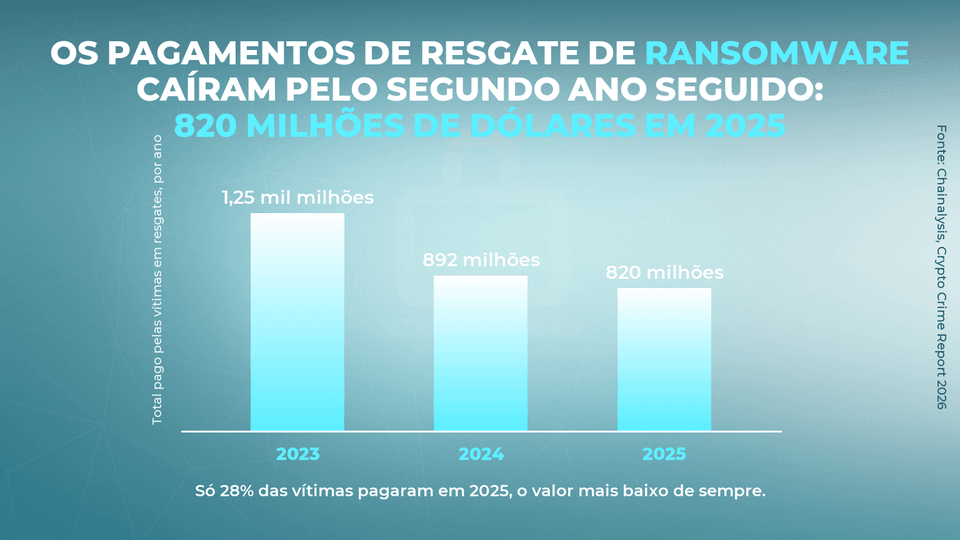
- Em 2025 as vítimas pagaram cerca de 820 milhões de dólares em resgates, menos 8% do que em 2024 e o segundo ano seguido a descer;
- No mesmo ano o número de ataques reclamados pelos grupos subiu cerca de 50%, o valor mais alto de sempre: há mais ataques e menos dinheiro a entrar;
- Só 28% das vítimas pagaram, o mínimo histórico. Mas quem paga paga muito mais: o resgate mediano passou de 12.738 para 59.556 dólares num ano;
- E em Portugal o CERT.PT registou 2 758 incidentes em 2024, mais 36% do que no ano anterior. Os casos de ransomware caíram 35%, mas os que aconteceram tiveram impacto muito mais amplo!
But what is Ransomware?
Ransomware é software malicioso, implantado por cibercriminosos com objetivo de extorsão. Quando um sistema é atacado, esse software encripta ficheiros ou bloqueia o dispositivo da vítima…
...or even worse: add the theft of confidential company information!
Having hijacked the device, the hackers blackmail their victims and demand a certain amount of money in exchange for decrypting the locked files. Hard to understand?
In order not to end this article without knowing what the word ransomware means, we asked our commercial director to explain the concept as simply as possible:
Há um ponto que nunca é demais relembrar: é certo que o cibercriminoso exige um resgate em dinheiro ou criptomoedas mas não há garantia de que o pagamento fará com que os seus ficheiros sejam recuperados!
For this reason, and more than in any other period in history, it is important that people and companies are prepared to assume a preventive behavior in the face of the escalation of this threat.
How does ransomware infection occur?
Malicious software introduced to a device through a ransomware attack can give the cybercriminal access to multiple systems in an organization...
...and this "highway" can be opened in many different ways!
Typically, infections occur from messages sent via social networks or from emails with links or booby-trapped attachments, such as PDFs or Word-formatted documents.

This is the usual sequence of crime:

Remember that a simple email can contain an infected attachment or a malicious link, which directs the user to download a corrupted file. If the recipient does not identify the threat in time, the ransomware will be downloaded onto your device!
Take extra care when surfing the Internet: especially on the desktop, it is common to be attacked by pop-ups that automatically open on the screen, presenting fraudulent promotions or advertisements. Often these are part of a ransomware phishing scheme!
➡️ See the article: Phishing: everything you need to know to avoid an attack

The difference between ransomware and other malicious software is that ransomware encrypts access to data and files on the attacked device. In this context, encrypting means making access possible only by using a decryption key.
It is at this stage that the cybercriminal establishes contact with the victim and demands a ransom, in exchange for the "key" that returns access to the encrypted data and files. How does the cybercriminal establish contact with the victim?
➡️ See the article: Cybercrime has invaded companies in Portugal: how to react?

Remember that the ransom demand can come in many forms. But there are two most common within a ransomware attack:
- A mensagem no fundo do ecrã da vítima;
- E a inclusão de ficheiros de texto em cada diretório encriptado.
I cannot remind you enough that you should not pay the ransom amount after a ransomware attack. There are no guarantees that you will get your files back. And you will be giving strength to these organized crime networks!

Os casos de ransomware acabam por desaguar milhões de euros na conta dos criminosos. E estes grupos não desaparecem quando são desmantelados: o LockBit foi abaixo numa operação policial internacional e, em outubro de 2025, regressou com uma nova variante e vítimas novas na Europa, nas Américas e na Ásia!
For all this, it is important that business owners are prepared to recognize this type of malicious software and prevent future damage. How? In the next chapter, we will look at the various types of ransomware that we know about.
Ransomware: What Types Exist?
Send an email to your employees with this information. The three main types of ransomware with a severity ranging from moderate to dangerous are:

scareware is a type of attack that uses harmfulsecurity software and attempts to provide fake technical assistance. If the computer is infected with some type of scareware, the user will receive pop-up messages informing him that a virus has been detected on the system...
...and that the way to eliminate it will be through a payment!
The pop-up's will continue to bombard the user until this software is deleted from the system. The problem is less common on Apple systems, although it also happens. This is what a scareware ransomware attack looks like:


Sometimes the cybercriminal opts for a more drastic strategy and seals the user's access to his own computer right from the start. This practice is what is known as screen-locking ransomware.
The case of the attack on the Expresso newspaper in Portugal was such an attack; but for further clarification let's look at another example:
- When starting thedevice, the user comes across an image with a stamp from the justice department of some country;
- This image informs the user of any illegal activity;
- And it warns the user that in order to regain access to his computer, a fine must be paid for this illegal activity!

This is a typical example of screen-locking ransomware. But remember: legal departments never contact citizens in this way. If they want to do so, they resort to appropriate legal avenues provided by law.

This type of attack blocks access to files on the victim's computer via encryption and demands a ransom to return that access. This is the most common form of ransomware attack.
There is no software capable of bringing back encrypted files, but sometimes some decryption codes are made public and absorbed by the major anti-virus programs on the market.
Since the word "encrypt" can sound complex, we asked our founder Nuno Diniz to explain how the encryption process works and what solutions exist after the damage is done:
Now that you recognize the main forms of ransomware, it's time to find out what kind of companies are on the cybercriminals' radar and what level of protection is best suited for your industry.
Who are the targets of ransomware?
When this type of cybercrime first emerged in the late 1980s, the victims were ordinary users - what we know in computer science as individual systems. But with practice, criminals realized that they could extend their attack radius to businesses...
...and the idea was so successful that it is to the companies that today they direct most of their attacks!

I will give you a practical idea of the serious problem that ransomware represents for companies today, especially in Portugal:
- Em 2024, 78% dos incidentes registados pelo CERT.PT aconteceram em entidades privadas, não em organismos do Estado;
- E o ransomware apareceu em 48% das violações de dados analisadas no relatório de 2026 da Verizon. Praticamente uma em cada duas!
➡️ Click for a free online checkup of your company
Alguns setores são mais afetados do que outros e você pode descobrir se o seu setor é um dos alvos preferenciais dos cibercriminosos, no gráfico da Barracuda que se segue:

Corporations suffer the most from ransomware attacks. This type of organization depends on data to function and bill, and when faced with long periods without access to these databases....
...are easily tempted to answer ransom demands for absurd amounts of money, in exchange for (eventual) regaining access to the encrypted data!
Outro aspeto que pode observar no gráfico é o facto dos municípios e instituições de saúde serem também alvos preferenciais. Esta tendência verificou-se em Portugal: CTT, EMEL, INEM, TAP e vários hospitais públicos foram algumas das instituições atacadas na vaga de 2021 e 2022. O padrão manteve-se: o Centro Nacional de Cibersegurança aponta a saúde, a educação e os serviços públicos como as áreas onde o ransomware deixou o rasto mais pesado!
But what to do in case of an attack?
We know that every situation has its own specifics, but there are six important steps you should follow if you are a victim of a ransomware attack:
- I cannot remind you enough: do not pay the ransom demanded by cybercriminals. This recommendation is so important that it has even been approved by the FBI;
- Keep stakeholders informed: employees, suppliers, customers, or board of directors. They can make the problem worse if they are not aware that they are being targeted;
- Stop data transmission from the attacked device: disconnect the computer from the network and any other equipment it may be connected to;
- Reset all your passwords on company devices that have not been infected - and that were not connected to the breached network at the time of the attack. Passwords may exist for other machines on the breached system;
- Identifique o tipo de ransomware de que foi alvo e partilhe a ocorrência com as forças de segurança. Em Portugal a Polícia Judiciária tem um departamento dedicado ao crime cibernético. E, desde abril de 2026, o Regime Jurídico da Cibersegurança obriga as entidades abrangidas a notificar o CNCS nas primeiras 24 horas depois de detetarem um incidente significativo;
- Contact your IT partnerto confirm if there is public information that allows your files to be decrypted. Your partner can (and should) restore and/or update programs, software and processes that may be corrupted or have vulnerabilities!

➡️ Veja o artigo: NIS2 em Portugal – quem está abrangido e o que fazer já
Na prática, é nas 24 horas que a maior parte das empresas tropeça. Um ataque de ransomware não escolhe a terça-feira de manhã: descobre-se às três da manhã de sábado. O relógio do CNCS começa a contar na deteção, não na segunda-feira. Quem não tem escrito numa página quem deteta, quem decide se o incidente é significativo e quem submete a notificação, perde o prazo enquanto ainda está a tentar perceber o que aconteceu.
Naturally, after the harm has been done, you must think about how to ensure that the problem does not happen again. And for this there is only one word: prevention.
A nossa sugestão é que, antes de qualquer investimento em segurança informática, você deve garantir que todos os colaboradores têm conhecimento sobre boas práticas de segurança. Porquê? Os números falam por si:
- O relatório de 2026 da Verizon analisou mais de 22 mil violações de dados confirmadas em 145 países e encontrou o fator humano em 62% delas;
- Nas notificações à Comissão Nacional de Proteção de Dados, a falha humana é a origem mais frequente de todas, à frente da exploração de vulnerabilidades e do phishing;
- E 69% das vítimas de ransomware não pagaram o resgate. Recusar deixou de ser a exceção e passou a ser o que a maioria faz!
➡️ Download our free Manual of Best Practices - Computer Security
Given the sharp increase in the number of cyber-attacks registered in recent months, Morebiz is holding a cybersecurity training course for all its clients. You can request yours for free at this link: informatica.morebiz.pt/interpol-alerta-quiz
Last note!
If you entered this article because you suffered an attack and have urgency to solve it, don't read the next chapter. Our team created it just so you can learn more about the origin of ransomware.
The origins of ransomware
Embark on a journey into the past and learn about the major phases of ransomware evolution throughout history.
📆 1989
For the more curious, this type of cybercrime emerged in the late 1980s and became popularized as PC Cyborg or AIDS. The process was innovative, to say the least: after the computer was attacked and rebooted 90 times (!) the user was required to enter a license...
...and that license could only be obtained in exchange for sending $189 by traditional mail! Take a look at what this threat looked like in the early days of its existence:

📆 2004
Almost two decades later, a new evolution of the threat emerges - GpCode - which did nothing more than encryption to hijack victims' personal data...
...this was the basis of the system we now know as traditional ransomware!

📆 2007
It was at this point that we saw the emergence of a new type of malicious software: Winlock which, instead of encrypting files, blocked users' access to their computers. How exactly?
The answer is simple and will shock you: the malware took control of the screen, displayed pornographic images, and demanded a ransom from the victim from the victim via SMS for that lock (and those images) to disappear from the screen!

📆 2012
Five years later what became known as government ransomware appeared. As in a traditional attack, the victim was unable to access his computer - and a message with symbols of government institutions was displayed on his screen.

The cybercriminal would then impersonate a state agency, inform the user that there was a conviction for committing a crime, and inform the user that a fine between $100 and $3,000 was required. The result?
The user, unfamiliar with this practice, was at a loss as to how to act and ended up paying the ransom - often because of the social embarrassment he felt in front of family and friends who watched his computer in this situation.
📆 2013
And here we come to the era of the notorious CryptoLocker: a type of ransomware that encrypts files on a remote server. This strain was so powerful that it took a global government task-force to take it out!
➡️ See the article: What is CryptoLocker ransomware and how to remove it
A year after its emergence, this type of malware and other similar families have appeared, on a large scale, on mobile devices as well. How?
The fraudulent malware was sent by malicious apps and asked the user to restart their phone in safe mode to delete the infected app and thus regain access to their device.

📆 2016
Finally comes KeRanger which was the first ransomware for Apple systems. With them, devices are attacked silently for about three days until the malware manifests itself and encrypts the system files.
Typically, the attack was carried out by downloading software called Transmission - a legitimate software for downloading Bittorrent files - whose original version had been replaced by a corrupted one carrying the malware.
➡️See the article: What it is and how to remove KeRanger OS X
Meanwhile Apple has released an update that can prevent the infection. Nowadays, this kind of ransomware is no longer a problem for users. Anyway, if you are using a very old version and your system is affected, this is where the files are hosted:

📆 2018
Naturalmente existiram inúmeras estirpes de ransomware que não foram abordadas neste artigo. Mas o escândalo do ataque aos jornais norteamericanos com o vírus Ryuk, em 2018, merece lugar de destaque na nossa cronologia. Porquê?
It perfectly symbolizes the change in strategy, on the part of cybercriminals, who have started attacking more and more institutions critical to the functioning of society.
➡️See the article: What is Ryuk ransomware
In this case, the problem reached such a scale that Times employees even had to hand-carry the pages from the newsroom to the printers. This was the look of the warning that newspapers received after being attacked:

There are thousands of different strains coming from the four corners of the planet. There are reports of viruses from Iran; others of malware from Russia. But the truth is that from all over the world arrive - and will continue to arrive - threats to the smooth running of your company.
O conselho de uma organização como a nossa, que opera nesta área desde 2006, é a prevenção e a formação de todos os colaboradores em boas práticas de cibersegurança. Parece cliché? Sim. Mas é essa a diferença mais comum entre as empresas atacadas e as que nunca sofreram um ataque!
Remember: our company can help you with the IT protection of your business critical data and equipment. It's simple: schedule a free 30-minute meeting with one of our experts now!

